こんにちは、ナナオです。
今回は私が愛用しているtigの使い方を説明していこうと思います。
tigとは
tigはターミナルなどで動作する、gitのTUIツールです。
コミットやステージング、スタッシュなどの操作をTUIで実行できるのが特徴です。
同じようなTUIツールだと、最近はlazygitなどが有名ですね。
インストール
インストールはbrewで行いました。
brew install tig
あとは任意のgitリポジトリのディレクトリでコマンドを実行します。
tig
以下のような画面になります。

この状態でsキーを押すと、ステージングファイルなどを見ることができます。
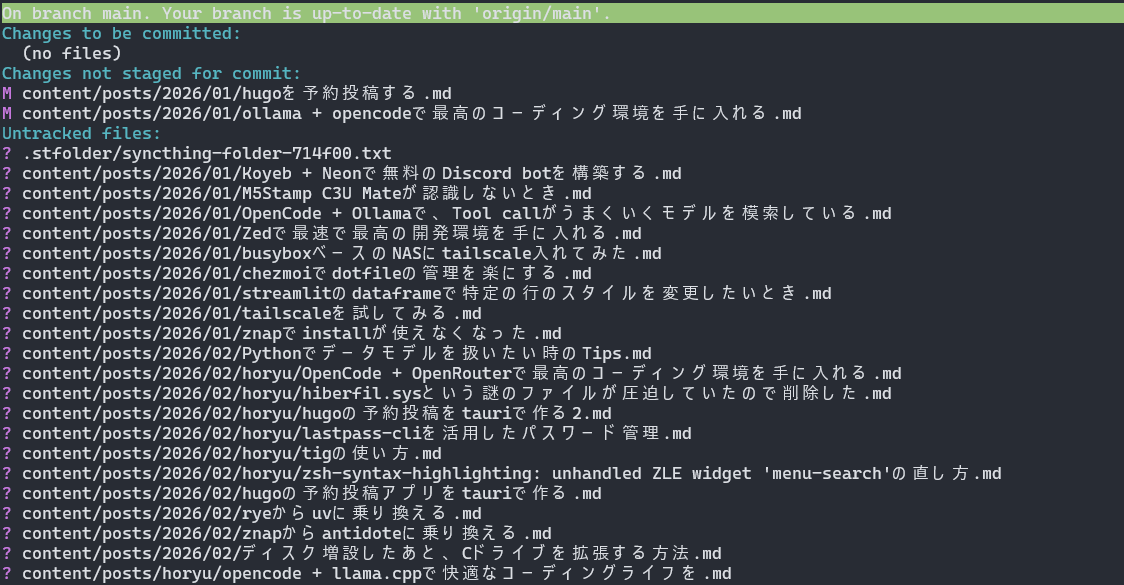
qキーを押すことで前の画面に戻れます。
カーソルの移動はvimっぽくjkキーで行えます。
また、.tigrcというファイルをホームディレクトリに配置することで、独自のキーカスタマイズも可能です。
私はこれを利用して、リポジトリへのプッシュやgit flowを行えるようにしています。
git-flowを行えるようにする.tigrc↓
dotfiles/tigrc.git-flow at master · darcyparker/dotfiles · GitHub
fetch / pull / pushを行う.tigrc↓
Tig で Git を自由自在に操作するための .tigrc 設定例 #hub - Qiita
# F で fetch (default: :toggle file-name / :toggle commit-title-refs)
bind generic F      ?git fetch %(remote)
bind main    F      ?git fetch %(remote)

# Alt-f で :toggle file-name / :toggle commit-title-refs
bind generic <Esc>f :toggle file-name
bind main    <Esc>f :toggle commit-title-refs

# U で pull
bind generic U      ?git pull %(remote)

# Alt-u で該当ブランチを更新
bind main    <Esc>u ?sh -c "git checkout %(branch) && git pull %(remote) --ff-only && git checkout -"
bind diff    <Esc>u ?sh -c "git checkout %(branch) && git pull %(remote) --ff-only && git checkout -"
bind refs    <Esc>u ?sh -c "git checkout %(branch) && git pull %(remote) --ff-only && git checkout -"

# P で remote への push
bind generic P      ?git push -u %(remote) %(repo:head)

# S で stash save
bind generic S      ?git stash save "%(prompt Enter stash comment: )"

# Bindings for git-flow.
#
# Flow bindings start with the capital F and then follow the first character of
# each operation. If executed from the refs view, the operations (that make
# sense to) work on the selected branch. Otherwise, they work on the currently
# checked out branch.
#
# Commands that finish a flow require confirmation to run. Commands that create
# a new flow prompt for user input and run when that input is accepted with no
# confirmation prompt.
#
# Note: Bindings assume the standard git-flow paths of feature, release, hotfix
# and support.
#
# To use these keybindings copy the file to your HOME directory and include it
# from your ~/.tigrc file:
#
#       $ cp contrib/git-flow.tigrc ~/.tigrc.git-flow
#       $ echo "source ~/.tigrc.git-flow" >> ~/.tigrc

# Get rid of default bindings for F, as that will be the entry point for all
# git-flow related commands with this binding.
bind main    F none
bind generic F none

# General
bind generic Fi ?git flow init

# Feature
bind generic Ffl !git flow feature
bind generic Ffs !git flow feature start "%(prompt New feature name: )"
bind generic Fff ?sh -c "git flow feature finish `echo %(repo:head) | sed -e s/feature.//`"
bind refs    Fff ?sh -c "git flow feature finish `echo %(branch) | sed -e s/feature.//`"

# Release
bind generic Frl !git flow release
bind generic Frs !git flow release start "%(prompt New release name: )"
bind generic Frf ?sh -c "git flow release finish `echo %(repo:head) | sed -e s/release.//`"
bind refs    Frf ?sh -c "git flow release finish `echo %(branch) | sed -e s/release.//`"

# Hot Fix
bind generic Fhl !git flow hotfix
bind generic Fhs !git flow hotfix start "%(prompt New hotfix name: )"
bind generic Fhf ?sh -c "git flow hotfix finish `echo %(repo:head) | sed -e s/hotfix.//`"
bind refs    Fhf ?sh -c "git flow hotfix finish `echo %(branch) | sed -e s/hotfix.//`"

# Support
bind generic Fsl !git flow support
bind refs    Fss !git flow support start "%(prompt New support name: )" %(branch)%
まとめ
カスタマイズもしやすいtig、おすすめです。
速度を求めるならgituiもおすすめです(Rust製なので速いみたいです)