こんにちは、ナナオです。
今回は、前回作ったhugoの予約投稿ツールをtauriでUI作って見やすくしようよ、という記事になります。
Githubはこちら↓
GitHub - satodaiki/hugo-local-cms: hugoの予約投稿管理
tauriのインストールと起動まで
まずはプロジェクトにtauriを入れます。
やり方はこちらを参考にします。
フロントエンドのビルドにはviteを利用します。
❯ npm create vite@latest .

> npx
> "create-vite" .

│
◇  Current directory is not empty. Please choose how to proceed:
│  Ignore files and continue
│
◇  Select a framework:
│  React
│
◇  Select a variant:
│  TypeScript
│
◇  Use rolldown-vite (Experimental)?:
│  No
│
◇  Install with npm and start now?
│  Yes
│
◇  Scaffolding project in /home/nanao/Project/personal/hugo-local-cms...
│
◇  Installing dependencies with npm...

added 175 packages, and audited 176 packages in 14s

45 packages are looking for funding
  run `npm fund` for details

found 0 vulnerabilities
│
◇  Starting dev server...
React + TypeScriptで実装することにしました。
次に以下のコマンドでtauri cliをインストールします。
cargo install tauri-cli --version "^2.0.0" --locked
tauri initでプロジェクトを初期化します。
❯ cargo tauri init
✔ What is your app name? · hugo-local-cms
✔ What should the window title be? · hugo-local-cms
✔ Where are your web assets (HTML/CSS/JS) located, relative to the "<current dir>/src-tauri/tauri.conf.json" file that will be created? · ../build
✔ What is the url of your dev server? · http://localhost:5173
✔ What is your frontend dev command? · npm run dev
✔ What is your frontend build command? · npm run build
動作確認します。
❯ cargo tauri dev

## ...中略...

Caused by:
  unable to get packages from source

Caused by:
  failed to parse manifest at `/home/nanao/.cargo/registry/src/index.crates.io-6f17d22bba15001f/dlopen2_derive-0.4.3/Cargo.toml`

Caused by:
  feature `edition2024` is required

  The package requires the Cargo feature called `edition2024`, but that feature is not stabilized in this version of Cargo (1.82.0 (8f40fc59f 2024-08-21)).
  Consider trying a newer version of Cargo (this may require the nightly release).
  See https://doc.rust-lang.org/nightly/cargo/reference/unstable.html#edition-2024 for more information about the status of this feature.
おっと、怒られてしまいました。
どうやら最新版のcargoが必要なようです。というかなんでこんな古いバージョン使っているんだ…?
ということでアップデートします。
❯ rustup toolchain install stable
info: syncing channel updates for 'stable-x86_64-unknown-linux-gnu'
info: latest update on 2026-01-22, rust version 1.93.0 (254b59607 2026-01-19)
info: downloading component 'rust-src'
info: downloading component 'cargo'
info: downloading component 'clippy'
info: downloading component 'rust-docs'
 20.7 MiB /  20.7 MiB (100 %)  11.0 MiB/s in  2s ETA:  0s
info: downloading component 'rust-std'
 28.2 MiB /  28.2 MiB (100 %)  11.1 MiB/s in  2s ETA:  0s
info: downloading component 'rustc'
 74.4 MiB /  74.4 MiB (100 %)  11.0 MiB/s in  8s ETA:  0s
info: downloading component 'rustfmt'
info: removing previous version of component 'rust-src'
info: removing previous version of component 'cargo'
info: removing previous version of component 'clippy'
info: removing previous version of component 'rust-docs'
info: removing previous version of component 'rust-std'
info: removing previous version of component 'rustc'
info: removing previous version of component 'rustfmt'
info: installing component 'rust-src'
info: installing component 'cargo'
info: installing component 'clippy'
info: installing component 'rust-docs'
 20.7 MiB /  20.7 MiB (100 %)   7.6 MiB/s in  2s ETA:  0s
info: installing component 'rust-std'
 28.2 MiB /  28.2 MiB (100 %)  16.8 MiB/s in  2s ETA:  0s
info: installing component 'rustc'
 74.4 MiB /  74.4 MiB (100 %)  15.6 MiB/s in  4s ETA:  0s
info: installing component 'rustfmt'

  stable-x86_64-unknown-linux-gnu updated - rustc 1.93.0 (254b59607 2026-01-19) (from rustc 1.80.1 (3f5fd8dd4 2024-08-06))

info: checking for self-update
info: downloading self-update
インストールした1.93.0をデフォルトバージョンにします。
rustup override set 1.93.0
もしくはrust-toolchain.tomlを以下のように変更します。(こっちのほうがバージョンがぱっと見でわかりやすいのでおススメ)
[toolchain]
channel = "1.93.0"
再度起動します。
cargo tauri dev

## ...中略...

warning: pango-sys@0.18.0:
error: failed to run custom build command for `pango-sys v0.18.0`

Caused by:
  process didn't exit successfully: `/home/nanao/Project/personal/hugo-local-cms/target/debug/build/pango-sys-fd05fa9553691c63/build-script-build` (exit status: 1)
  --- stdout
  cargo:rerun-if-env-changed=PANGO_NO_PKG_CONFIG
  cargo:rerun-if-env-changed=PKG_CONFIG_x86_64-unknown-linux-gnu
  cargo:rerun-if-env-changed=PKG_CONFIG_x86_64_unknown_linux_gnu
  cargo:rerun-if-env-changed=HOST_PKG_CONFIG
  cargo:rerun-if-env-changed=PKG_CONFIG
  cargo:rerun-if-env-changed=PKG_CONFIG_PATH_x86_64-unknown-linux-gnu
  cargo:rerun-if-env-changed=PKG_CONFIG_PATH_x86_64_unknown_linux_gnu
  cargo:rerun-if-env-changed=HOST_PKG_CONFIG_PATH
  cargo:rerun-if-env-changed=PKG_CONFIG_PATH
  cargo:rerun-if-env-changed=PKG_CONFIG_LIBDIR_x86_64-unknown-linux-gnu
  cargo:rerun-if-env-changed=PKG_CONFIG_LIBDIR_x86_64_unknown_linux_gnu
  cargo:rerun-if-env-changed=HOST_PKG_CONFIG_LIBDIR
  cargo:rerun-if-env-changed=PKG_CONFIG_LIBDIR
  cargo:rerun-if-env-changed=PKG_CONFIG_SYSROOT_DIR_x86_64-unknown-linux-gnu
  cargo:rerun-if-env-changed=PKG_CONFIG_SYSROOT_DIR_x86_64_unknown_linux_gnu
  cargo:rerun-if-env-changed=HOST_PKG_CONFIG_SYSROOT_DIR
  cargo:rerun-if-env-changed=PKG_CONFIG_SYSROOT_DIR
  cargo:warning=
  pkg-config exited with status code 1
  > PKG_CONFIG_ALLOW_SYSTEM_CFLAGS=1 pkg-config --libs --cflags pango 'pango >= 1.40'

  The system library `pango` required by crate `pango-sys` was not found.
  The file `pango.pc` needs to be installed and the PKG_CONFIG_PATH environment variable must contain its parent directory.
  The PKG_CONFIG_PATH environment variable is not set.

  HINT: if you have installed the library, try setting PKG_CONFIG_PATH to the directory containing `pango.pc`.

warning: build failed, waiting for other jobs to finish...
warning: javascriptcore-rs-sys@1.1.1:
error: failed to run custom build command for `javascriptcore-rs-sys v1.1.1`

Caused by:
  process didn't exit successfully: `/home/nanao/Project/personal/hugo-local-cms/target/debug/build/javascriptcore-rs-sys-df3a61a68b819658/build-script-build` (exit status: 1)
  --- stdout
  cargo:rerun-if-env-changed=JAVASCRIPTCOREGTK_4.1_NO_PKG_CONFIG
  cargo:rerun-if-env-changed=PKG_CONFIG_x86_64-unknown-linux-gnu
  cargo:rerun-if-env-changed=PKG_CONFIG_x86_64_unknown_linux_gnu
  cargo:rerun-if-env-changed=HOST_PKG_CONFIG
  cargo:rerun-if-env-changed=PKG_CONFIG
  cargo:rerun-if-env-changed=PKG_CONFIG_PATH_x86_64-unknown-linux-gnu
  cargo:rerun-if-env-changed=PKG_CONFIG_PATH_x86_64_unknown_linux_gnu
  cargo:rerun-if-env-changed=HOST_PKG_CONFIG_PATH
  cargo:rerun-if-env-changed=PKG_CONFIG_PATH
  cargo:rerun-if-env-changed=PKG_CONFIG_LIBDIR_x86_64-unknown-linux-gnu
  cargo:rerun-if-env-changed=PKG_CONFIG_LIBDIR_x86_64_unknown_linux_gnu
  cargo:rerun-if-env-changed=HOST_PKG_CONFIG_LIBDIR
  cargo:rerun-if-env-changed=PKG_CONFIG_LIBDIR
  cargo:rerun-if-env-changed=PKG_CONFIG_SYSROOT_DIR_x86_64-unknown-linux-gnu
  cargo:rerun-if-env-changed=PKG_CONFIG_SYSROOT_DIR_x86_64_unknown_linux_gnu
  cargo:rerun-if-env-changed=HOST_PKG_CONFIG_SYSROOT_DIR
  cargo:rerun-if-env-changed=PKG_CONFIG_SYSROOT_DIR
  cargo:warning=
  pkg-config exited with status code 1
  > PKG_CONFIG_ALLOW_SYSTEM_CFLAGS=1 pkg-config --libs --cflags javascriptcoregtk-4.1 'javascriptcoregtk-4.1 >= 2.38'

  The system library `javascriptcoregtk-4.1` required by crate `javascriptcore-rs-sys` was not found.
  The file `javascriptcoregtk-4.1.pc` needs to be installed and the PKG_CONFIG_PATH environment variable must contain its parent directory.
  The PKG_CONFIG_PATH environment variable is not set.

  HINT: if you have installed the library, try setting PKG_CONFIG_PATH to the directory containing `javascriptcoregtk-4.1.pc`.

warning: gio-sys@0.18.1:
error: failed to run custom build command for `gio-sys v0.18.1`

Caused by:
  process didn't exit successfully: `/home/nanao/Project/personal/hugo-local-cms/target/debug/build/gio-sys-e5acacd9c51e2d82/build-script-build` (exit status: 1)
  --- stdout
  cargo:rerun-if-env-changed=GIO_2.0_NO_PKG_CONFIG
  cargo:rerun-if-env-changed=PKG_CONFIG_x86_64-unknown-linux-gnu
  cargo:rerun-if-env-changed=PKG_CONFIG_x86_64_unknown_linux_gnu
  cargo:rerun-if-env-changed=HOST_PKG_CONFIG
  cargo:rerun-if-env-changed=PKG_CONFIG
  cargo:rerun-if-env-changed=PKG_CONFIG_PATH_x86_64-unknown-linux-gnu
  cargo:rerun-if-env-changed=PKG_CONFIG_PATH_x86_64_unknown_linux_gnu
  cargo:rerun-if-env-changed=HOST_PKG_CONFIG_PATH
  cargo:rerun-if-env-changed=PKG_CONFIG_PATH
  cargo:rerun-if-env-changed=PKG_CONFIG_LIBDIR_x86_64-unknown-linux-gnu
  cargo:rerun-if-env-changed=PKG_CONFIG_LIBDIR_x86_64_unknown_linux_gnu
  cargo:rerun-if-env-changed=HOST_PKG_CONFIG_LIBDIR
  cargo:rerun-if-env-changed=PKG_CONFIG_LIBDIR
  cargo:rerun-if-env-changed=PKG_CONFIG_SYSROOT_DIR_x86_64-unknown-linux-gnu
  cargo:rerun-if-env-changed=PKG_CONFIG_SYSROOT_DIR_x86_64_unknown_linux_gnu
  cargo:rerun-if-env-changed=HOST_PKG_CONFIG_SYSROOT_DIR
  cargo:rerun-if-env-changed=PKG_CONFIG_SYSROOT_DIR
  cargo:warning=
  pkg-config exited with status code 1
  > PKG_CONFIG_ALLOW_SYSTEM_CFLAGS=1 pkg-config --libs --cflags gio-2.0 'gio-2.0 >= 2.70'

  The system library `gio-2.0` required by crate `gio-sys` was not found.
  The file `gio-2.0.pc` needs to be installed and the PKG_CONFIG_PATH environment variable must contain its parent directory.
  The PKG_CONFIG_PATH environment variable is not set.

  HINT: if you have installed the library, try setting PKG_CONFIG_PATH to the directory containing `gio-2.0.pc`.
うーん、長めのエラーが出てしまいました。
以下のQiitaの記事を参考に直します。
UbuntuのRustでTauriを使おうと思ったら手こずった話 #cargo - Qiita
以下をインストールしました。
sudo apt-get install javascriptcoregtk-4.1 libsoup-3.0 webkit2gtk-4.1 -y
動きました!
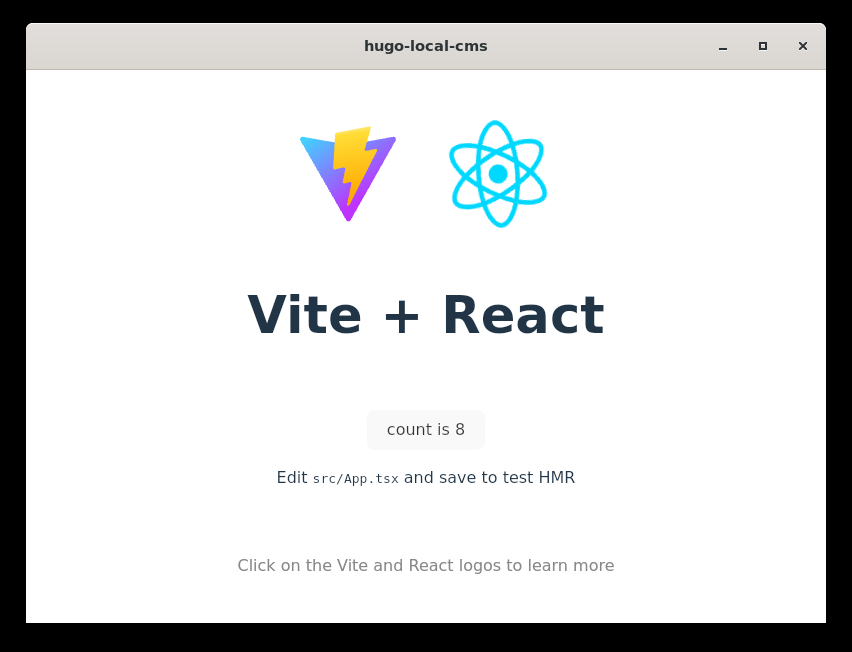
WSLを使っている環境なので、ちょっと起動に手こずってしまいましたが、なんとかうまくいきました。。
Tauriによる実装
src-tauriに移動し、必要なライブラリをインストールしておきます。
cargo add serde_yaml chrono regex
次に設定ファイルを読み込む処理を実装していきます。
src-tauri/src/lib.rsを以下のように修正します。
use serde::{Deserialize, Serialize};
use std::fs;
use std::path::Path;

#[derive(Debug, Serialize, Deserialize, Clone)]
struct ScheduledPost {
    date: String,
    file: String,
}

#[derive(Debug, Serialize, Deserialize, Clone)]
struct Config {
    workdir: String,
    scheduled: Vec<ScheduledPost>,
}

const CONFIG_PATH: &str = "../config.yaml"; // パスは適宜調整

#[tauri::command]
fn get_config() -> Result<Config, String> {
    let content = fs::read_to_string(CONFIG_PATH).map_err(|e| e.to_string())?;
    let config: Config = serde_yaml::from_str(&content).map_err(|e| e.to_string())?;
    Ok(config)
}

#[tauri::command]
fn save_config(config: Config) -> Result<(), String> {
    let yaml = serde_yaml::to_string(&config).map_err(|e| e.to_string())?;
    fs::write(CONFIG_PATH, yaml).map_err(|e| e.to_string())?;
    Ok(())
}

#[cfg_attr(mobile, tauri::mobile_entry_point)]
pub fn run() {
    tauri::Builder::default()
        .setup(|app| {
            if cfg!(debug_assertions) {
                app.handle().plugin(
                    tauri_plugin_log::Builder::default()
                        .level(log::LevelFilter::Info)
                        .build(),
                )?;
            }
            Ok(())
        })
        .invoke_handler(tauri::generate_handler![get_config, save_config])
        .run(tauri::generate_context!())
        .expect("error while running tauri application");
}
これでRust側にコマンドを実装することができました。
このコマンドをフロントエンド側から使えるようにしましょう。
ライブラリをインストールします。
ni @tauri-apps/api
インストールしたらsrc/App.tsxを修正します。
import { useState, useEffect } from "react";
import { invoke } from "@tauri-apps/api/core";
import "./App.css";

// Rust側と合わせた型定義
interface ScheduledPost {
  date: string;
  file: string;
}

interface Config {
  workdir: string;
  scheduled: ScheduledPost[];
}

function App() {
  const [config, setConfig] = useState<Config | null>(null);
  const [newDate, setNewDate] = useState("");
  const [newFile, setNewFile] = useState("");

  // 初期読み込み
  useEffect(() => {
    loadConfig();
  }, []);

  const loadConfig = async () => {
    try {
      const res = await invoke<Config>("get_config");
      setConfig(res);
    } catch (err) {
      console.error("設定の読み込みに失敗:", err);
    }
  };

  const handleSave = async () => {
    if (!config) return;
    try {
      await invoke("save_config", { config });
      alert("config.yaml を更新しました");
    } catch (err) {
      alert("保存失敗: " + err);
    }
  };
  const addSchedule = () => {
    if (!config || !newDate || !newFile) return;
    const newScheduled = [
      ...config.scheduled,
      { date: newDate, file: newFile },
    ];
    setConfig({ ...config, scheduled: newScheduled });
    setNewDate("");
    setNewFile("");
  };

  const removeSchedule = (index: number) => {
    if (!config) return;
    const newScheduled = config.scheduled.filter((_, i) => i !== index);
    setConfig({ ...config, scheduled: newScheduled });
  };

  if (!config) return <div>Loading...</div>;

  return (
    <>
      <div className="container">
        <h1>Hugo Local CMS</h1>

        <section className="config-section">
          <label>作業ディレクトリ (WorkDir):</label>
          <input
            type="text"
            value={config.workdir}
            onChange={(e) => setConfig({ ...config, workdir: e.target.value })}
          />
        </section>

        <hr />

        <section className="list-section">
          <h2>予約投稿リスト</h2>
          <table>
            <thead>
              <tr>
                <th>投稿予定日時</th>
                <th>ファイルパス</th>
                <th>操作</th>
              </tr>
            </thead>
            <tbody>
              {config.scheduled.map((post, index) => (
                <tr key={index}>
                  <td>{post.date}</td>
                  <td>{post.file}</td>
                  <td>
                    <button
                      onClick={() => removeSchedule(index)}
                      className="btn-delete"
                    >
                      削除
                    </button>
                  </td>
                </tr>
              ))}
            </tbody>
          </table>
        </section>

        <section className="add-section">
          <h3>新規予約追加</h3>
          <div className="input-group">
            <input
              type="text"
              placeholder="2026/01/20 18:00:00"
              value={newDate}
              onChange={(e) => setNewDate(e.target.value)}
            />
            <input
              type="text"
              placeholder="content/posts/test.md"
              value={newFile}
              onChange={(e) => setNewFile(e.target.value)}
            />
            <button onClick={addSchedule}>リストに追加</button>
          </div>
        </section>

        <footer className="footer">
          <button onClick={handleSave} className="btn-save">
            config.yaml に保存
          </button>
        </footer>
      </div>
    </>
  );
}

export default App;
cssも修正します。
.container {
  padding: 20px;
  font-family: sans-serif;
  max-width: 800px;
  margin: 0 auto;
}
.config-section input {
  width: 100%;
  padding: 8px;
  margin-top: 5px;
}
table {
  width: 100%;
  border-collapse: collapse;
  margin: 20px 0;
}
th,
td {
  border: 1px solid #ddd;
  padding: 10px;
  text-align: left;
}
.input-group {
  display: flex;
  gap: 10px;
  margin-bottom: 20px;
}
.input-group input {
  flex: 1;
  padding: 8px;
}
.btn-save {
  background: #007bff;
  color: white;
  padding: 10px 20px;
  border: none;
  cursor: pointer;
  width: 100%;
  font-size: 1.1em;
}
.btn-delete {
  background: #dc3545;
  color: white;
  border: none;
  padding: 5px 10px;
  cursor: pointer;
}
.footer {
  position: sticky;
  bottom: 20px;
}
起動してみます。
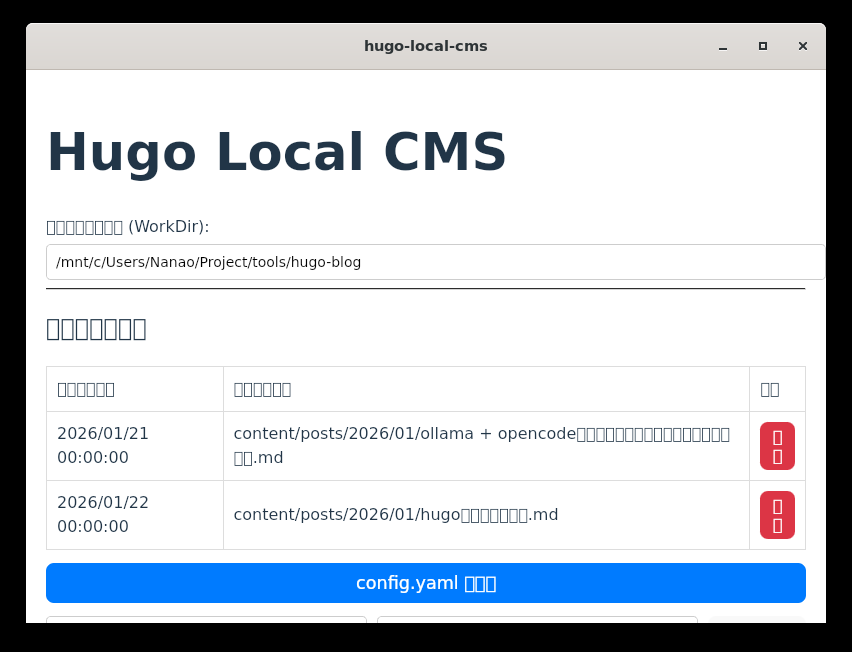
文字化けしていますが、まぁ一応起動しました。
設定ファイルも読み込んでいるようです。すごいぞ、tauri。
まとめ
一旦力尽きてしまったのでまた次回にします。。
次回は予約投稿したい記事を選択できるところまで実装したいですね。